Summary
Google Maps is launching a major update that changes how people use driving directions. The new "Immersive Navigation" feature uses artificial intelligence to turn flat maps into 3D views of the real world. This update is designed to help drivers see their surroundings more clearly, making it easier to find turns and landmarks. Along with the visual changes, Google is adding a smart chatbot called "Ask Maps" to help users find specific places using simple questions.
Main Impact
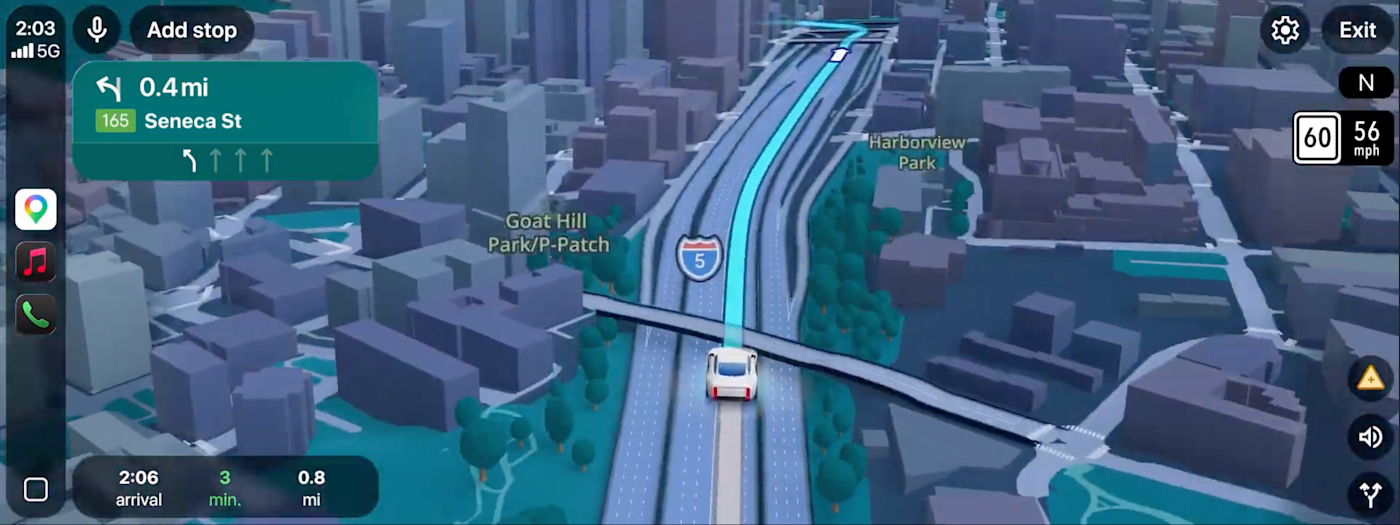
The biggest change in this update is the move from 2D maps to a 3D experience. For years, drivers have looked at flat lines and shapes on their screens. Now, Google Maps will show 3D versions of buildings, bridges, and trees. This helps drivers recognize where they are by looking at the screen and then looking out their window. It reduces the confusion that often happens at complex highway exits or busy city intersections.
Key Details
What Happened
Google has integrated its Gemini AI technology into the Maps app. This AI helps the app understand the world better by looking at millions of Street View images and aerial photos. The result is a navigation screen that looks much more like the real world. The app can now highlight important road features like traffic lights, stop signs, and crosswalks at the exact moment a driver needs to see them. This ensures that drivers do not miss their turns or exits because they were confused by the map.
Important Numbers and Facts
Google describes this as the most significant update to Maps in about ten years. The rollout begins today for users in the United States. It will be available on both Android and iOS devices. The update also works with in-car systems like Apple CarPlay and Android Auto. The "Ask Maps" chatbot is launching first in the United States and India, with plans to bring it to desktop computers in the near future. The AI models used for these features are part of Google's latest Gemini 3 series.
Background and Context
Google has been adding AI features to many of its products lately. We have already seen these changes in Gmail and the Chrome browser. Maps is the next big service to get these tools. The goal is to make technology feel more natural and helpful. In the past, using a map required the driver to do a lot of the work, such as reading street names and matching them to signs. By using 3D images and smarter voice commands, Google is trying to take some of that work away from the driver so they can focus on the road.
New Features for Drivers
Beyond the 3D view, Google has improved how the app talks to you. The voice guidance now sounds more like a person sitting in the passenger seat. Instead of just saying "turn right in 500 feet," the app might say "go past this exit and take the next one." This is very helpful when street names are hard to read or when you are driving in a place you have never visited before.
The app also helps you plan your trip better. When you look for a way to get to your destination, Maps will show you different routes and explain the differences. It might tell you that one road is faster but has more traffic, while another road is longer but offers a smoother drive. Once you arrive, the app will even show you a preview of the building and suggest the best places to park your car.
The "Ask Maps" Chatbot
A new icon labeled "Ask Maps" is appearing inside the app. This allows users to talk to the map like they are talking to a friend. Instead of searching for "coffee shops" and reading dozens of reviews, you can ask a specific question. For example, you could type, "Find me a place where I can charge my phone and get a snack without a long wait." The AI will look through all the information it has about local businesses to give you a personalized answer. It can even suggest places based on where you have gone in the past. If you like the suggestion, you can book a table or save the location directly through the chat.
What This Means Going Forward
This update shows that Google wants Maps to be more than just a tool for directions. It is becoming a personal assistant for travel. As the AI gets better, the map will likely become even more personalized. This could change how local businesses attract customers, as the AI will be the one recommending shops and restaurants to users. For drivers, it means less stress when navigating new areas. The technology will continue to expand to more countries and languages over the next few months.
Final Take
Google is using AI to make digital maps feel more like the physical world. By adding 3D views and a helpful chatbot, the company is making it easier for people to explore new places without getting lost or overwhelmed. This update marks a major shift in how we interact with our phones while we are on the move.
Frequently Asked Questions
What is Immersive Navigation in Google Maps?
It is a new driving mode that shows your surroundings in 3D. It uses AI to display realistic buildings, landmarks, and road signs to help you find your way more easily.
How does the "Ask Maps" feature work?
It is an AI chatbot within the app. You can ask it specific questions in plain English, like finding a quiet place to work, and it will give you recommendations based on reviews and your personal preferences.
When can I start using these new features?
The 3D driving features are rolling out now in the United States for Android and iOS. The "Ask Maps" tool is available in the United States and India, with more locations coming soon.