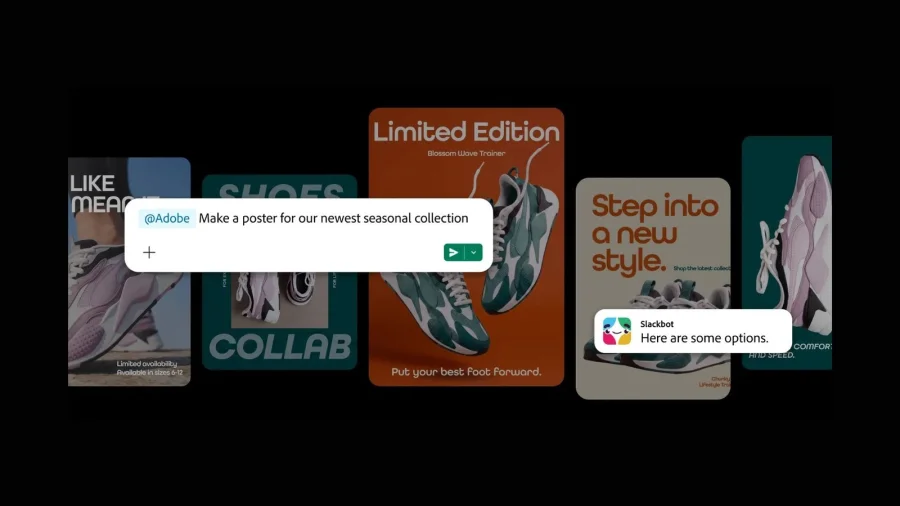
Imagine a marketing manager who needs a product image cleaned up before a client call — but no designer is online. Under Adobe's latest move, that request could land with Slackbot, with no separate creative app required. Adobe says it has added more than 70 tools from its flagship apps into Slack, including capabilities tied to Photoshop, Illustrator and Premiere Pro.
Slackbot Just Joined the Creative Workflow
Adobe has brought dozens of tools from its creative suite directly into Slack, the team messaging platform that anchors daily work for millions of companies. The announcement describes the experience as asking Slackbot to handle creative actions inside a conversation, rather than exporting files and switching contexts.
Photoshop, the industry-standard image editor, sits alongside vector-design tool Illustrator and video-editing app Premiere Pro in the integration. A complete, feature-by-feature breakdown was not part of the announcement.
Why Designing Inside a Chat Window Changes Team Speed
The practical effect is speed. Workers no longer need to toggle between Slack and a heavy application for every small request. A shareable thumbnail, a background removal, or a quick video trim could be completed in the same thread where the request was made.
For many organizations, Slack is already where approvals, feedback and files converge. Adding creative tools effectively turns a chat thread into a lightweight workflow engine.
The Quiet Shift in How Adobe Ships Its Software
The move reflects a broader direction at Adobe: its tools are increasingly meeting users inside the platforms where work actually happens, instead of pulling them into a separate environment.
Adobe has not said how long this Slack integration was in development, and no detailed technical background accompanied the announcement. What is clear is that the company is betting on conversational access to creative power.
Which Teams Feel the Impact First
Small teams without dedicated designers are the most obvious beneficiaries. Marketing, social media and customer-support teams handle constant visual requests while designers stay focused on bigger projects.
The conversational format matters too. Slackbot's chat interface lowers the barrier for non-creatives, who no longer need to navigate complex menus to make basic edits. That is a meaningful change for anyone who has ever waited on a design ticket for a simple crop.
What Adobe's Announcement Actually Confirms
Adobe's own framing centers on removing friction between collaboration and creation. No direct executive quotes were available beyond the announcement, and Slack — owned by Salesforce — has not separately detailed the technical rollout in the material reviewed.
The original story describes the core idea simply: users can ask Slackbot to "do the Photoshopping" for them. Beyond that, the official communication leaves room for interpretation.
Why This Feels Different From Earlier Adobe Plugins
Adobe apps have offered connectors for years — file viewers, review links and export shortcuts that bridge the gap between design tools and workplace software. Embedding more than 70 tools inside the chat interface itself is a more ambitious bet, because Slackbot becomes an active creative assistant rather than a passive bridge.
This analysis is based on what the announcement signals, not on disclosed technical details. Adobe has not yet explained how it decides which creative tasks are safe to automate inside a chatbot context.
What Is Confirmed vs What Is Still Vague
Confirmed: Adobe is adding 70+ tools from its creative apps into Slack; Photoshop, Illustrator and Premiere Pro are part of the lineup; users can direct Slackbot to carry out creative actions in chat.
Unclear: The complete list of tools, the complexity of edits Slackbot can handle, rollout timing, regional availability and pricing. None of these have been disclosed, and any claim about them would be speculation.
Why Adobe's Creative Ecosystem Remains Hard to Copy
Even inside another company's interface, the underlying value still flows through Adobe. Photoshop and Illustrator carry decades of user habit, proprietary file formats and plugin ecosystems that challengers have found difficult to dislodge.
For Slack, the integration strengthens its position as a neutral workspace where tools come to the user. Both companies benefit: Adobe gains visibility in daily workflows, while Slack gains a marquee creative partner.
Where This Kind of Automation Gets Tricky
Creative judgment is difficult to automate. An automated edit may miss brand guidelines, cultural context, or a designer's intent — particularly for complex or sensitive visuals.
Enterprise teams will also need answers on data handling. Images and prompts shared in Slack could be processed by Adobe systems, raising privacy and governance questions that neither company has fully addressed in the available announcement. These concerns do not make the integration unappealing; they simply make a cautious rollout sensible.
Chat Is Becoming the Control Panel for Everyday Software
Adobe's announcement fits a larger industry pattern. Software makers are packing powerful actions into chat interfaces — from AI coding assistants to chatbots that draft documents, build slides and now edit creative assets.
What is notable here is that even specialist creative tools are joining the wave, meeting users inside their most frequently opened application rather than waiting to be opened themselves.
How Teams Should Prepare for Adobe Tools in Slack
Until Adobe publishes the full tool list and rollout schedule, the prudent approach is to test with low-stakes work rather than rebuilding entire design workflows around the integration.
Design leads should identify which repetitive requests can be safely automated and which still demand human hands. IT teams, meanwhile, should review where data is processed before enabling the integration broadly across the organization.
Where This Partnership Could Head Next
If the Slackbot experiment succeeds, deeper integration is plausible — shared creative approvals, automated resizing inside channels, or AI-assisted asset generation triggered by a simple command. These remain possibilities, not commitments.
Adobe could also extend a similar toolkit to other collaboration platforms. For now, the company's stated focus is bringing creative capability closer to the conversation where work begins.
Our Take
This announcement is less about replacing designers than about rescuing them from repetitive requests. If Slackbot absorbs the low-level edits, human creatives gain more time for the work that actually requires taste